Multi-judge gymnastics scoring — where separate D and E judges cover each apparatus — is the standard format for club and regional competitions running to BG or FIG rules. The E judges each assess execution independently; their scores are averaged to produce the final E value.
In ChalkItUp, until now, that meant every E judge needed their own login. Their own phone or tablet. Their own PIN. Their own account set up in advance by the admin. For a competition with three E judges per apparatus across four events, that's twelve accounts to create, twelve PINs to distribute, and twelve devices to troubleshoot on the day.
Shared device mode reduces that to four. One per apparatus.
How it works
When your organisation has multi-judge mode enabled, each apparatus panel gets a single Device PIN instead of individual judge accounts. All E judges at that apparatus enter their scores on one shared tablet using the same PIN. The scoring screen shows one field per E judge — E1, E2, E3, and so on — and each judge enters their own score in their own field simultaneously. The system handles the averaging, and optional drop-high/low, automatically.
The D judge is unchanged. They use their own device and their own PIN as normal. The shared device only covers the E judging side.
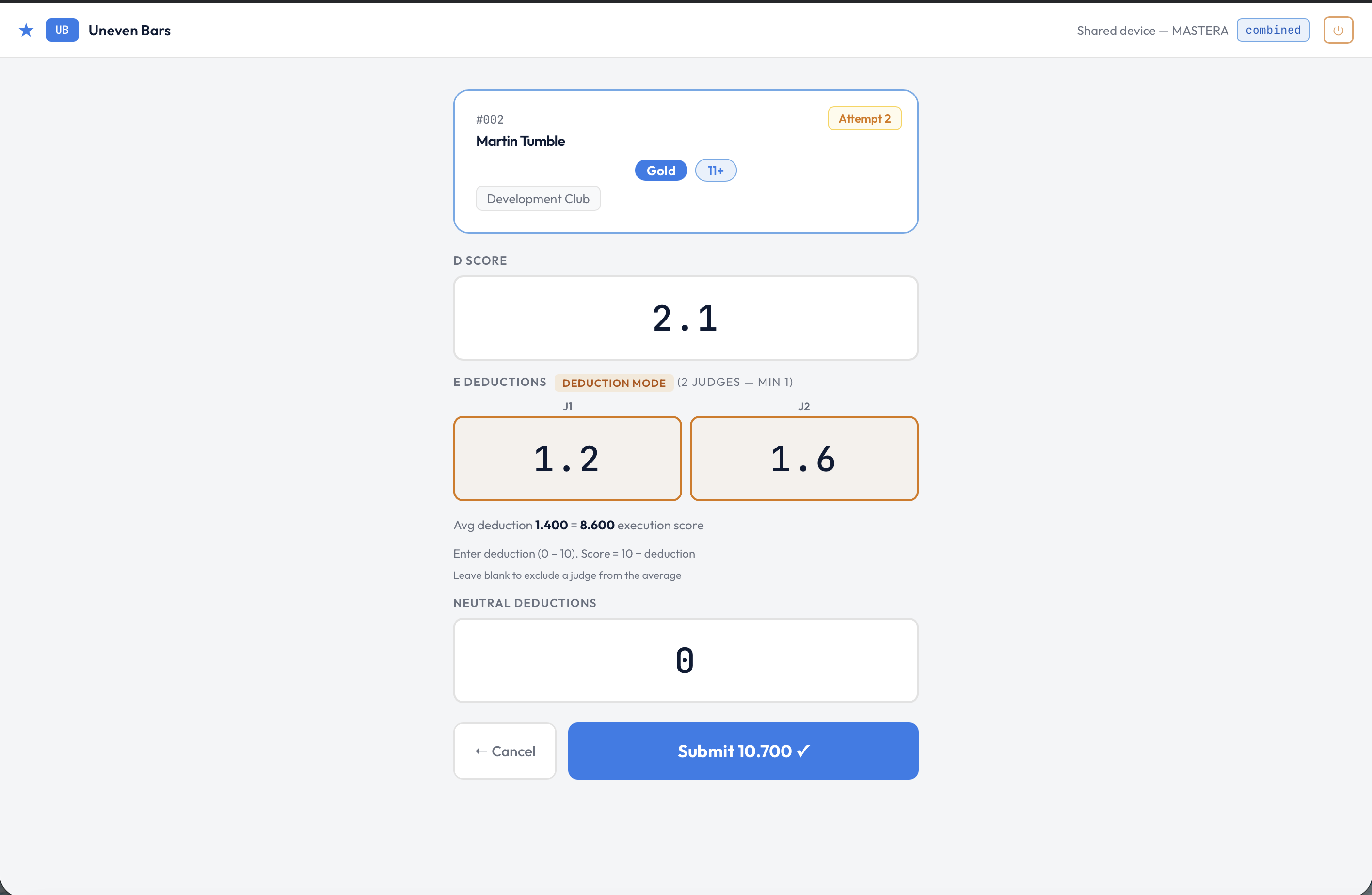
One tablet, one apparatus — each E judge enters their score in their own field.
The setup is automatic
If your organisation has multi-judge mode enabled, clicking Auto-setup panels creates shared device panels for every apparatus — no extra configuration needed. The Device PIN is generated automatically and shown in the panel card. The Copy logins button on the panel copies the Device PIN text so you can paste it directly into a briefing message or printed sheet.
Judge helper cards — the credit-card-sized PDFs you can hand out before the competition — now print a single card per apparatus for shared device panels, showing the Device PIN with a note that all E judges at that apparatus use the same one. One card at the judging station instead of one per person.
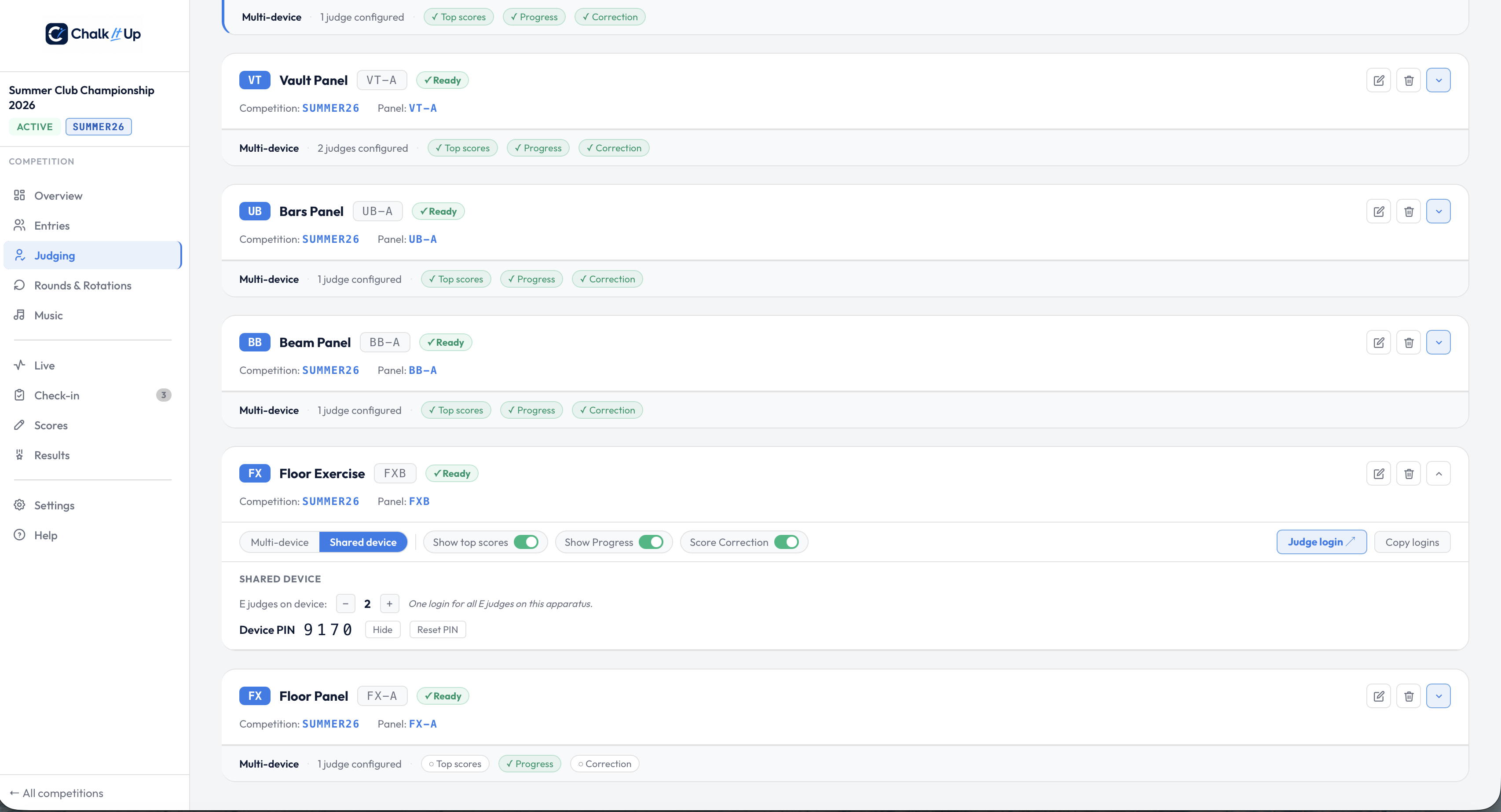
A shared device panel on the Panels page — Device PIN generated, ready to copy or print.
When shared device makes sense
Shared device — use when
- Two or three E judges share one tablet at the apparatus
- Speed and simplicity are the priority
- You don't need a per-judge record in the system
- You're running a club or regional competition
Multi-device — use when
- Each E judge has their own device and submits independently
- A full per-judge audit trail is required
- Judges are scoring remotely or from different positions
- You need to identify individual scores by judge
Score corrections on shared device panels
If a shared device submission needs correcting, the admin correction modal in ChalkItUp shows individual E judge fields (J1, J2…) pre-filled from the original submission, with a live average updating as you edit. Drop-high/low is applied automatically when four or more E scores are in. The correction is logged with the admin's name and a reason, as normal.
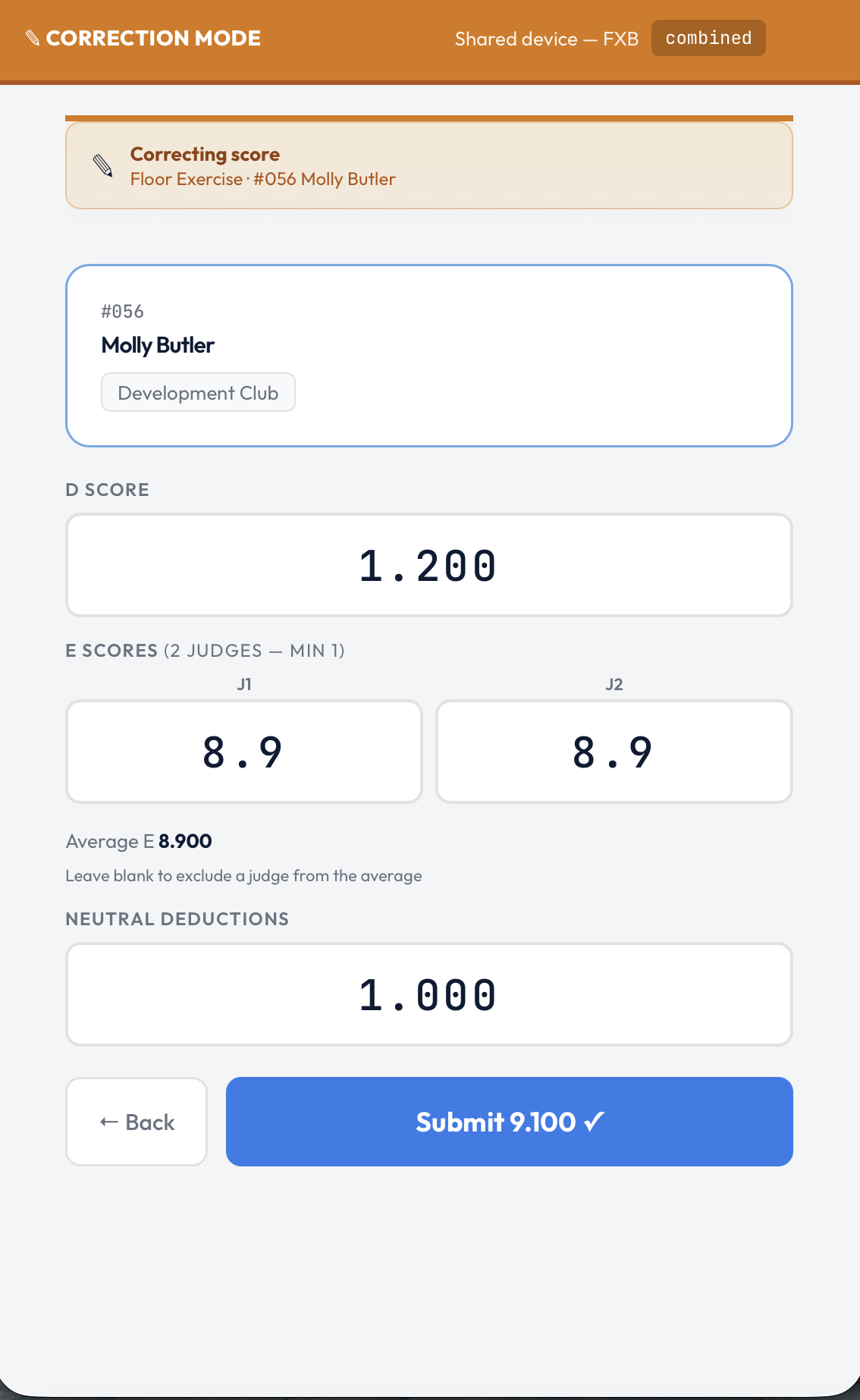
Correcting a shared device score — individual judge fields, live average, as normal.
Shared device mode is included in Standard and Club Annual plans. Multi-judge scoring — including shared device mode — requires the Standard plan or above. If you're running a competition with multiple E judges, it's worth the upgrade to avoid managing individual accounts for every judge on every panel.
What this changes for competition day
The biggest effect isn't technical — it's the briefing. Instead of distributing individual PINs to every E judge and checking each one has the right account on the right device, the pre-competition briefing becomes: "Here's the tablet. Here's the PIN. E1 enter your score in field one, E2 in field two. Any questions?" That's a meaningfully shorter conversation to have in a busy venue at 8am.
Running a multi-judge competition this season?
ChalkItUp supports shared device and multi-device E judging, all in one system. Start a free trial and configure your panel setup before the day arrives.
Start free trial →